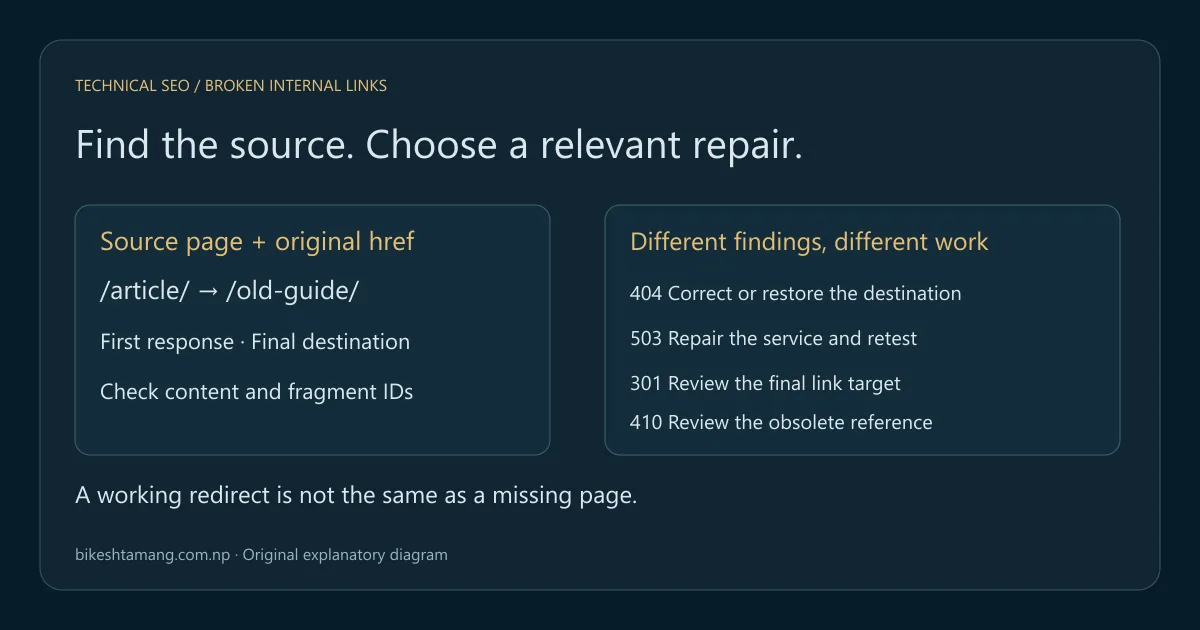
Fix broken links by identifying the page that contains the link, checking the original address and final destination, then choosing a repair that matches the content's purpose. Correct a typo, restore a missing resource, update a moved destination or remove an obsolete reference. A redirect to an unrelated homepage is not a reliable universal fix.
This guide focuses on broken internal links and the source changes that prevent visitors from repeating the same failure. It includes a local practice lab with deliberate errors and a generated repair log. The exercise uses fictional content and loopback requests, not a client website or a claim about this site's live errors.
Key takeaways
- Record the source page and original
href, not just the failed destination. - Separate missing pages, redirects, fragment errors and server failures.
- Match the repair to the intended content and verify the published source link.
- Test shared navigation and templates as well as individual articles.
Table of contents
- Identify the source page and the failing link
- Separate broken links from other response problems
- Check the original href and its resolved URL
- Run the local broken-link practice lab
- Choose a repair for each finding
- Fix template links at their source
- Retest the source and the final destination
- Keep a repair log that supports the next review
- Frequently asked questions
- Start with one reproducible repair
Identify the source page and the failing link
A useful broken-link report connects each destination to the pages that link to it. Save the source URL, link text, original href, resolved destination, first response and final response. Without the source, you may repair a redirect while leaving hundreds of pages pointing at an obsolete address.
The Screaming Frog broken-link tutorial explains destination checks and the inlinks view used to locate source pages. Use your crawler's equivalent report and inspect the source in the published page. A link in an exported content field can differ from the final rendered link.
Include navigation, breadcrumbs, related-article modules and editorial links in your review. A shared component can produce the same wrong URL across many templates. Group those rows by source component when planning repairs, while retaining the affected page examples for the retest.
For a broader linking plan, use the internal linking audit process. This task is narrower: find the specific failure, decide what the link should do and verify that the source now leads there. An exhaustive list of domain errors without those decisions is not a completed repair.
Separate broken links from other response problems
Check the response and the content together. A missing destination, a temporary outage, an access restriction and a successful page with the wrong content need different actions. Even a 200 response can be unsuitable if the expected page has been replaced by a generic error screen.
Google's HTTP status documentation distinguishes successful responses, redirects, client errors and server failures. MDN's 404 reference explains that the server did not find the resource. Interpret those observations before deciding whether to change a link or repair the destination.
| Observation | What to investigate | Typical repair direction |
|---|---|---|
| 404 at the intended address | Typo, accidental deletion or moved content | Correct the source, restore content or use a relevant new URL |
| Intentional 410 | Whether the reference still serves a reader | Remove or rewrite the obsolete reference |
| 301 or 308 to a relevant page | Whether source links still use an old address | Update those links to the final intended URL |
| 403 or login challenge | Audience, authorization and delivery rules | Restore appropriate access or describe the restricted destination |
| 5xx or timeout | Server behavior and reproducibility | Repair the service and retest before rewriting useful links |
| 200 but missing fragment | Whether the target heading or ID changed | Correct the fragment or restore the intended anchor |
A working redirect is not automatically a broken link. It can still be worth updating to reduce avoidable hops and make the source destination explicit. Likewise, an intentionally missing retired page is not a reason to restore obsolete content. The problem can be the surviving link that still recommends it.
Check the original href and its resolved URL
Relative links depend on the source page's address and any applicable base URL. A link that works at the site root can point somewhere else inside an article directory. Inspect the resolved destination in the browser or crawler and compare it with the author's intended destination.
Look for path case changes, missing characters, extra slashes, encoded characters and accidental staging hosts. Do not normalize those differences away while investigating. Different servers handle them differently, and a seemingly harmless rewrite can hide the original failure.
Google's crawlable link guidance recommends ordinary anchors with usable href values and descriptive link text. An interactive element that looks like a link may depend on a script rather than supply a destination the crawler can follow. Review the rendered behavior as well as the source attribute.
Fragments require a separate check. The server normally receives the page resource without the #section portion, so a 200 response does not establish that the named anchor exists. Verify the intended heading or ID. A renamed heading can break a useful deep link even when the page's main URL is unchanged.
Run the local broken-link practice lab
Download the broken-link repair practice lab. It contains original and corrected source pages, a Python runner, expected results and a README. It requires Python 3.10 or newer with no third-party packages.
Extract the archive, open a terminal in its folder and run:
python run_lab.pyThe runner starts a temporary server bound to 127.0.0.1 on an available port, tests only its own fixed demonstration routes and shuts the server down afterward. It does not crawl an external website, accept a target domain or read your Search Console account. You will receive a repair-log.csv and lab-results.json in the extracted folder; rerunning replaces those files.
The original page contains six links: a mistyped destination, an old URL with a working redirect, a missing fragment, a simulated server outage, an intentionally removed page and a valid link. The corrected page has five usable references after the retired reference is removed and the other issues are repaired.
The test checks actual local responses and anchor IDs for the exercise. Its successful fixed run is evidence about this deliberately small lab only. It does not establish that a production template, remote website or every fragment on a real site has been checked.
Choose a repair for each finding
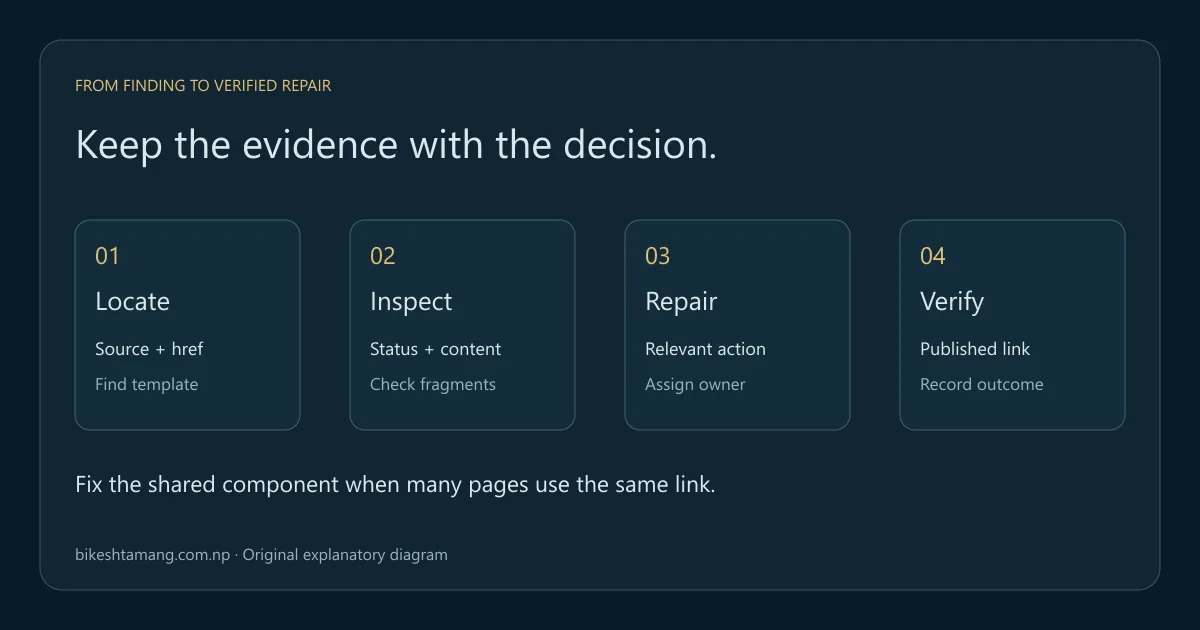
Use the reader's intended next step to decide the destination. The lab exposes several cases that can look similar in a high-level error count but require different work. Keep the reason for each decision in the repair log so another editor understands why a link changed.
Correct a typo or restore accidentally missing content
If the source contains a typo and the intended page is available, correct the href in the source. Retest that exact page and link. Creating a permanent redirect for every accidental spelling can leave unnecessary rules when a direct correction solves the observed internal reference.
If a valuable page was accidentally removed, restoring it at its established URL may be the suitable repair. Confirm its purpose and ownership before publishing a replacement. Do not assume the nearest existing slug answers the same question merely because it contains similar words.
Update a moved destination and review its redirect
When content permanently moves, update internal links to the relevant final URL and review how old external or bookmarked addresses should behave. The 301 versus 302 guide explains the redirect decision. A source-link correction and a legacy redirect can both be necessary, but they solve different paths into the content.
Google's site-move guidance advises mapping changed URLs to relevant destinations and avoiding irrelevant redirects. Do not send every removed article or product to the homepage. A technically successful redirect still fails the reader when the replacement does not cover the promised topic.
Repair the service when the destination is still intended
A reproducible 503 or timeout can indicate an availability problem rather than a bad editorial link. Record when it failed, inspect the relevant service and retest after the server repair. Removing all links to a useful page would conceal the symptom while leaving the underlying availability issue unresolved.
For a 403, distinguish an intentionally restricted page from an unintended block. A crawler and an authenticated editor can receive different responses. Review the request and access policy before changing security settings or calling the destination permanently removed. The Cloudflare and Googlebot troubleshooting guide covers a specific delivery investigation.
Remove a reference when no suitable destination exists
If the content is intentionally retired and no relevant replacement exists, rewrite or remove the reference. Keep the surrounding sentence understandable. Do not leave unlinked text promising a resource the reader can no longer use, and do not replace it with an unrelated page just to remove an error from the report.
Document whether the missing destination is intentional. An appropriate 404 or 410 can coexist with a clean internal-link structure when the website no longer points readers at that resource. The repair belongs in the surviving source rather than a blanket restoration of every retired path.
Fix template links at their source
If the same broken reference appears in a menu, footer, product card or related-post component, identify the shared source. Repair the component or data record, then inspect examples from several affected templates. A manual edit to one article will not correct a link generated elsewhere.
Record scope with the decision: which templates use the component, which languages or markets are affected and which page examples will be retested. If a responsive menu differs from desktop navigation, check both. A repaired desktop link does not establish that the mobile component uses the same value.
Review the destination's preferred URL before applying a bulk update. Use the canonical URL guide when equivalent versions compete. A large replacement operation should be based on a reviewed mapping rather than a pattern that accidentally rewrites distinct content paths.
For release-related failures, add the source-link checks to the website redesign SEO checklist. Its worked launch test checks destinations and indexing signals; the repair log here adds the original linking page and the follow-up verification.
Retest the source and the final destination
After publication, open the changed source page and inspect the actual link. Record its current href, first response, final address, final response and intended content. For a fragment repair, confirm that the named target exists and that the browser reaches the useful section.
Repeat the relevant crawl or component checks with comparable settings. Retain the original failing result and the corrected observation. Mark the row complete only when its acceptance criteria pass; an editor's proposed destination is not equivalent to an observed working reference.
If a page is still absent from the reachable crawl despite having no broken references in the sampled set, investigate discovery separately. The orphan-page comparison guide explains how to compare reachable pages with known inventories. Fixing a bad link and connecting a disconnected page can be related, but they are not interchangeable diagnoses.
Keep a repair log that supports the next review
Use one row per source reference, with a stable source path as well as any absolute test address. The lab's CSV includes original href, first/final status, final destination, finding, proposed action, owner and retest fields. Its local host includes a temporary port that will change on another run; compare the stable paths and outcomes rather than treating that port as a production URL.
Choose a review cadence based on how frequently the site changes and which failures matter. A catalog import, navigation change or redesign is a good reason for an additional check. A daily count that nobody investigates is less useful than a reviewed queue with clear owners and reproducible evidence.
Do not forecast a ranking lift from a reduced error total. A successful repair establishes a better working route for readers and crawlers. Search results depend on other factors too, and no number of repaired links guarantees a particular CTR or position.
Frequently asked questions
Should I redirect every 404 to the homepage?
No. Choose a relevant replacement when one exists. If the old content is intentionally gone without a suitable replacement, keep the intended removal response and remove obsolete internal references. A generic homepage redirect can frustrate visitors and fail to represent the old content.
Is a link through a 301 always broken?
No. A working permanent redirect can lead to the correct page. Review whether the internal source should use that final URL directly. Keep useful legacy routing for other entry paths when appropriate instead of removing a redirect simply because an internal link was updated.
Why does a link checker pass a broken section link?
Some checkers test only the page's response. The fragment after # is handled separately, so the resource can return 200 while the named section is absent. Check the destination ID or use a tool that explicitly validates fragments.
Can the practice lab audit my website?
No. It tests a fixed local demonstration to teach the repair process. Use your site's crawler exports, source pages and live response evidence for a real audit. The lab intentionally avoids accepting remote target addresses or claiming complete coverage.
Start with one reproducible repair
Choose an important failed reference, locate its source and document the intended destination. Apply the smallest appropriate repair and retest the published result. Then group similar failures by component or content decision. If routing and template behavior conflict, technical SEO support can help turn the evidence into a scoped fix.