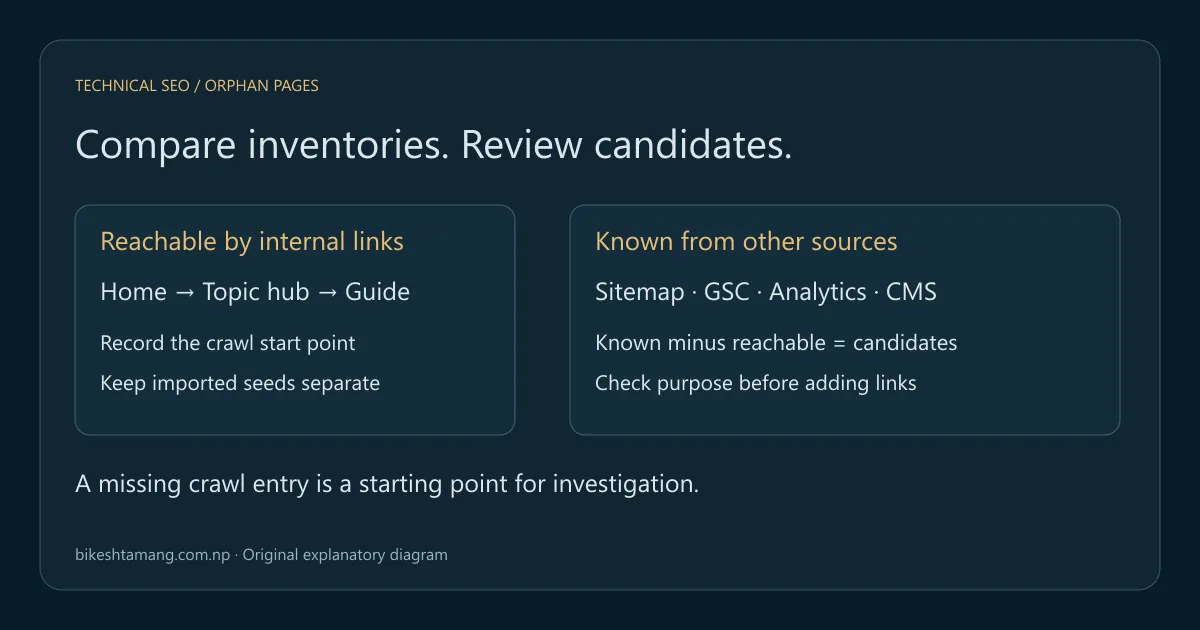
To find orphan pages, compare the URLs reachable through your site's internal links with URLs known from sitemaps, Search Console, analytics and your publishing system. Investigate the difference before adding links or removing pages. A missing crawl entry is a candidate, not proof that the page has no useful purpose.
This tutorial gives you a repeatable comparison exercise, conservative URL matching rules and a decision worksheet. The downloadable examples use a fictional website. They are designed to expose false positives and illustrate the process; they are not a crawl of this website or a client case study.
Key takeaways
- Define the crawl start point and discovery settings before comparing lists.
- Keep link-discovered URLs separate from sitemap or analytics seed URLs.
- Preserve meaningful URL differences until their behavior is verified.
- Review each candidate's content, access and purpose before choosing a fix.
Table of contents
- Define an orphan page for this audit
- Collect a crawl-discovered URL list
- Build the known-URL inventory from several sources
- Normalize URLs without hiding real differences
- Compare known URLs with the reachable set
- Work through the five sample decisions
- Add a useful path from reachable content
- Recrawl and retain the evidence
- Frequently asked questions
- Complete one candidate before expanding the audit
Define an orphan page for this audit
An orphan page has no observed internal-link path from your chosen crawl start point. It can still be known from a sitemap, an external link or historical search activity. A group of pages can link to one another while remaining disconnected from the reachable site.
The Screaming Frog orphan-page tutorial uses this start-point definition and combines additional URL sources with link discovery. That is more useful than assuming every page with any inlink is reachable. Keep the definition in your audit notes so another reviewer can reproduce your result.
Start from the canonical homepage if you are assessing the public site's main navigation. If you start inside a documentation section, your conclusion concerns that section's reachable graph. It does not automatically describe the whole domain. Also record whether navigation requires JavaScript, a login, a selected market or a particular language.
A page that takes several clicks to reach is not necessarily orphaned. A page absent from Google is not necessarily orphaned either. Internal reachability, indexing and search performance are different observations. Use the broader internal linking strategy guide to plan the site's hierarchy after the diagnostic work.
Collect a crawl-discovered URL list
Run a crawl from the agreed start URL and retain the configuration with its date. Record the hostname, included paths, rendering mode, access restrictions and any crawl limit. A crawl stopped partway through a large catalog cannot establish that the remaining pages have no incoming route.
For this comparison, export the pages discovered by following links from the starting graph. Do not silently mix in URLs loaded from a sitemap, analytics or a manual list. Those extra sources are useful for finding candidates, but importing them does not create an internal-link path.
When a crawler offers combined discovery, retain the discovery source or use its orphan analysis report. Confirm how the tool defines that field in its current documentation. You need to distinguish “the crawler requested this URL” from “the crawler reached it by following the website's links.”
Check representative templates before trusting the export. If the crawl cannot see links in your product menu or article pagination, it can make reachable pages look disconnected. Google's JavaScript SEO documentation explains the distinction between initial HTML and rendering. Record which view your crawler used instead of assuming every crawling tool reproduces Google's rendering behavior.
Build the known-URL inventory from several sources
Create a second inventory of URLs that might deserve review. Include published content records, current sitemaps, historical landing pages and important legacy destinations. Preserve the source label and observation date for each entry. This makes a candidate easier to interpret than an unexplained address in a single merged list.
| Source | What it contributes | Limitation to record |
|---|---|---|
| XML sitemap | Intended discovery inventory | Can contain outdated URLs or omit published pages |
| Search Console page export | URLs associated with reported search activity | Depends on dates, filters and reporting limits |
| Analytics landing pages | Observed entrances | Depends on tracking, consent and the chosen period |
| CMS published records | Content still marked published | May include utility or campaign pages |
| Historical maps and backlinks | Older destinations still worth checking | Can include moved or intentionally removed URLs |
Use the XML sitemap validation guide before treating that source as clean. An old redirected address in a sitemap is an inventory problem to review, not necessarily a live page that needs a new navigation link.
For Search Console, save the property, date range, search type and any country, device or page filters. Google's Performance report guidance explains the report's setup and dimensions. A page absent from a filtered export is not proven nonexistent. The query-to-page analysis tutorial helps keep the reporting task explicit.
Normalize URLs without hiding real differences
Normalize only differences you can justify. Removing a fragment is appropriate when comparing page resources, while lowercasing a path or deleting every query parameter can combine distinct pages. Keep an original URL column so the comparison never destroys your evidence.
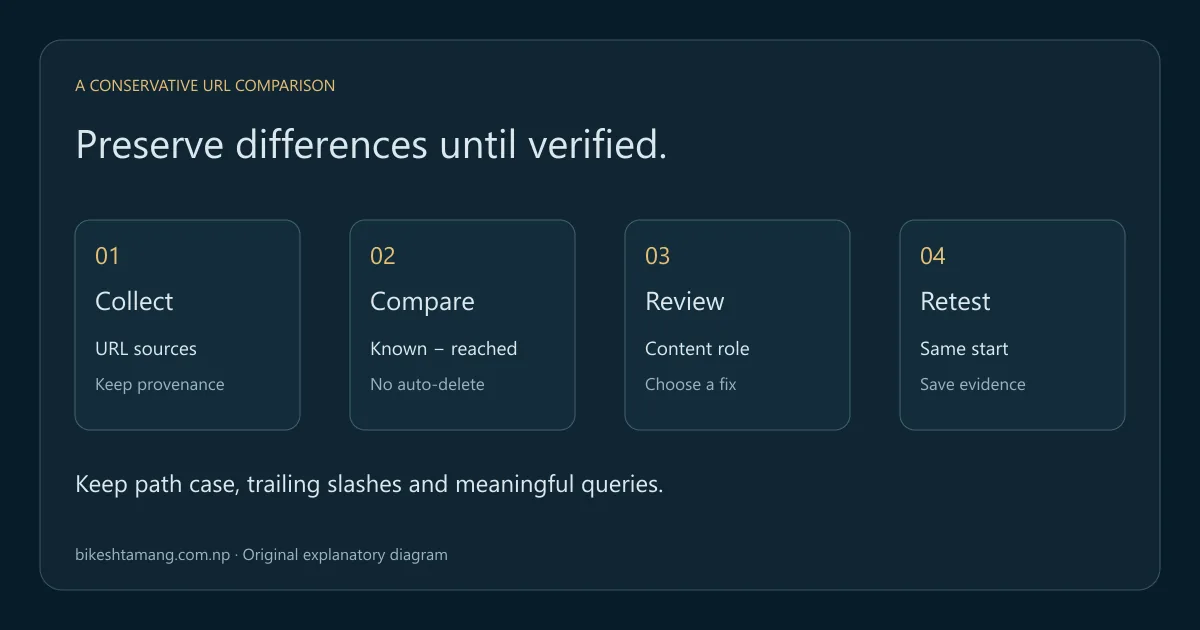
The practice script lowercases the scheme and host, removes a default port, supplies a slash for an empty path and removes fragments. It preserves path case, path trailing slashes, query strings and their order. Those conservative rules can leave apparent duplicates for manual review; that is preferable to silently losing a meaningful variation.
Do not automatically combine www and non-www, HTTP and HTTPS, or two market hosts. Verify redirects and preferred URLs first. Similarly, ?color=green might identify useful product content, while a tracking parameter might not change the page. An audit rule needs evidence from the actual site.
Google's canonicalization guidance recommends consistent preferred URLs across internal links and other signals. Review a mismatch against that policy. A canonical tag suggests a preferred version; it does not prove that every URL difference can safely be erased in your input files.
Compare known URLs with the reachable set
The basic comparison is known URLs minus link-reachable URLs. Its output is a candidate queue. Every item still needs a check of response status, content, canonical evidence, internal links and intended audience. A removed page or a deliberately separate campaign page can be a valid result rather than a defect.
Download the orphan-page comparison practice kit. It includes a reachable URL list, labeled known-URL records, a comparison script, expected output and a JSON decision worksheet. It requires Python 3.10 or newer and uses only the standard library. It reads local files and makes no network requests.
After extracting it, open a terminal in the folder and run:
python compare_urls.pyThe sample produces five candidates. One known URL with an uppercase host and fragment matches the reachable page after conservative normalization. A product color variant remains a candidate because the script preserves its query string. The expected-result file makes these choices visible so you can check that the comparison behaves as described.
To use your own inputs, replace the sample files with one absolute URL per line in reachable.txt and a JSON array of objects containing url and source in known.json. Keep the supplied samples elsewhere if you want to repeat the exercise. Run the script again and review the new candidates.json; the output replaces the earlier result file.
Work through the five sample decisions
The kit's review worksheet labels all its observations illustrative. The comparison itself establishes only that these example addresses are missing from the example reachable set. It does not fetch the pages or verify the review notes. Keep that boundary when adapting the worksheet for your own evidence.
| Candidate | Illustrative review | Suitable next action |
|---|---|---|
/guides/unlinked/ | Useful published guide; no observed reachable path | Add a relevant link from an existing reachable guide |
/campaign/spring/ | Intentionally separate campaign destination | Confirm audience and indexing policy with its owner |
/old-guide/ | Old address now redirects to a relevant guide | Correct stale source inventories; inspect the final page |
/products/mug/?color=green | Variant may overlap its parent product | Review content and canonical policy before linking |
/archive/retired/ | Intentionally removed; no replacement | Remove obsolete inventory references; retain intended removal |
Notice that only the first row directly calls for an internal link. Adding a link to every candidate would revive retired paths and potentially amplify duplicates. Removing every candidate would delete a useful guide and possibly a working campaign destination. The worksheet is a review process rather than an automatic cleanup instruction.
For each real candidate, record an owner, response evidence, intended canonical, relevant source page and final decision. If another team controls the campaign or catalog, resolve that page's role before changing navigation. An unfamiliar URL is a reason to investigate, not sufficient authorization to retire useful content.
Add a useful path from reachable content
For a valuable page that belongs in the public site, select a reachable source page whose reader would benefit from the destination. Add a descriptive link where the explanation leads naturally to the deeper task. Use a normal anchor with an href and check the published result.
Google's link best practices explain crawlable anchors and useful link text. Do not invent a fixed number of internal links as a ranking requirement. One well-placed path can repair the observed disconnection; additional links should serve real navigation or explanatory needs.
If the source page is also orphaned, its new link does not connect the group to the main graph. Start with a page already reachable from the agreed entry point, such as a topic hub, service page or relevant article. Then check any sibling links that make sense within the group.
Preserve the destination's actual page role. A temporary campaign need not become a permanent top-level menu item. An obsolete guide that has been merged may need a relevant redirect and updated source links instead. Use the canonical tag guide when the decision concerns duplicate versions rather than missing navigation.
Recrawl and retain the evidence
Repeat the crawl with the same start point and comparable settings after the change is live. Confirm that the new source link exists and that the destination is discovered through a link path. A successful direct request to the destination alone does not verify the repair.
Keep the before-and-after URL lists and the source page's location or screenshot. Record whether the destination returns the expected response and whether its relevant content is accessible. If its path still does not appear, inspect the source page, rendering mode and crawl exclusions before adding more links.
Review crawl access separately from navigation. Google's robots.txt introduction distinguishes crawler access from search indexing controls. A link can exist while a crawl setting prevents it from being followed. Correct the diagnosis rather than describing every exclusion as an orphan-page problem.
Track search results only after the structural check. Repairing an internal path does not establish an immediate indexing or ranking change. Use consistent page, query, country and device comparisons if you later evaluate performance. Keep a low-volume page's result open until there is enough evidence to interpret it.
Frequently asked questions
Can an orphan page already be indexed?
Yes. It can be discovered through an external link, a sitemap or a historical route. Your audit concerns the observed internal path from a stated start point. Existing impressions do not prove that today's navigation still reaches the page.
Can I find every orphan page using only a sitemap?
No. A sitemap supplies a known-URL source, not a complete record of all content ever published. Compare multiple sources and record their limits. You cannot guarantee discovery of a page omitted from every inventory you can access.
Are zero inlinks the only useful signal?
No. Disconnected groups can contain links to one another, and imported seed URLs can appear in a crawl without a path from the homepage. Check the discovery method and reachability report rather than relying on an unexplained inlink count.
Should every orphan-page candidate be redirected?
No. A useful page may need a relevant internal link, while a duplicate or retired page needs a different decision. A redirect is appropriate only when there is a relevant intended destination. Document the content role before applying a technical fix.
Complete one candidate before expanding the audit
Start with a clearly useful guide, confirm why the crawl missed it and connect it from reachable relevant content. Recrawl and retain the evidence. Use that completed example to refine your process for larger groups. If you need help interpreting conflicting sources, an SEO audit can turn the candidate queue into documented decisions.