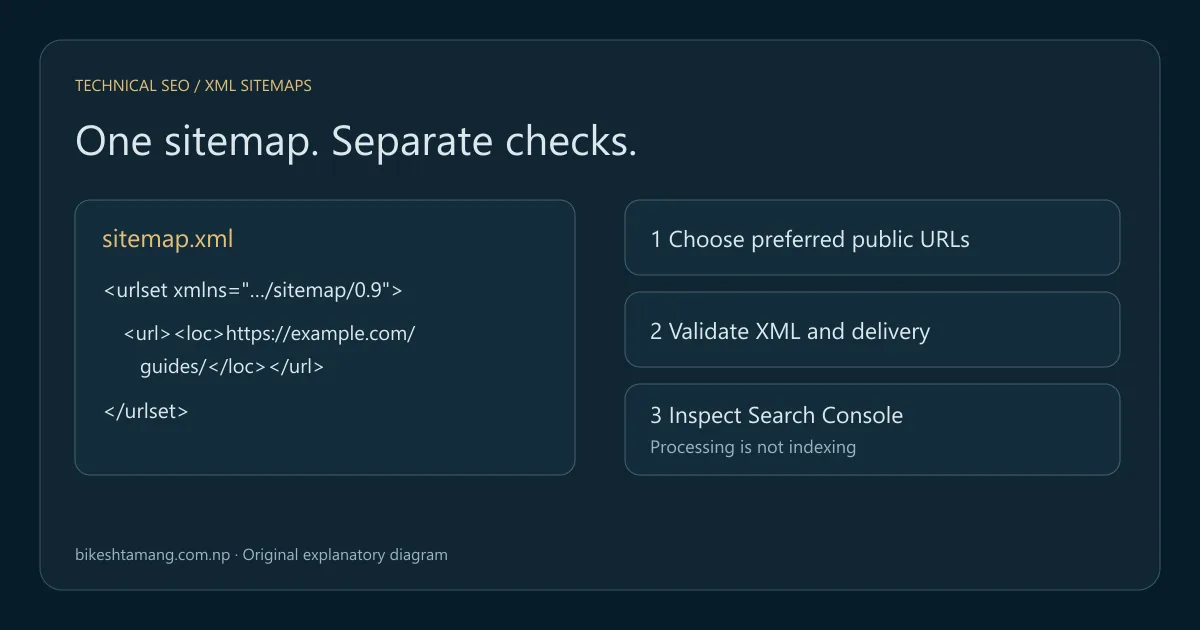
An XML sitemap lists the public URLs you want search engines to discover. To make it useful, publish valid XML, include the preferred versions of your pages, keep the list current and check the response that search engines receive. A submitted sitemap does not guarantee that its pages will be indexed.
This guide takes you from a small working example to a repeatable validation process. You will distinguish XML problems from delivery failures and page-level indexing decisions. The downloadable practice kit includes valid files, deliberately broken files and a local Python checker. Its URLs use example.com; they are teaching fixtures, not evidence from a client website.
Key takeaways
- Validate the file and the URLs it describes as separate tasks.
- Keep preferred, public page URLs consistent with internal links and canonicals.
- Check the delivered response after publishing, not just the generator output.
- Use Search Console to investigate sitemap processing and individual page indexing separately.
Table of contents
- What an XML sitemap does for SEO
- Start with a valid XML sitemap example
- Decide which URLs belong in the file
- Validate XML before investigating indexing
- Check the public sitemap response after publishing
- Submit the right address in Search Console
- Interpret Search Console sitemap errors
- Follow the right CMS-specific troubleshooting path
- Separate sitemap success from search performance
- Frequently asked questions
- Your next step
What an XML sitemap does for SEO
A sitemap supplies a discovery list. It is useful when new pages have few links, a site has a large catalog or content is difficult to reach through normal navigation. Google's sitemap overview explains when it can help and notes that good internal linking still matters.
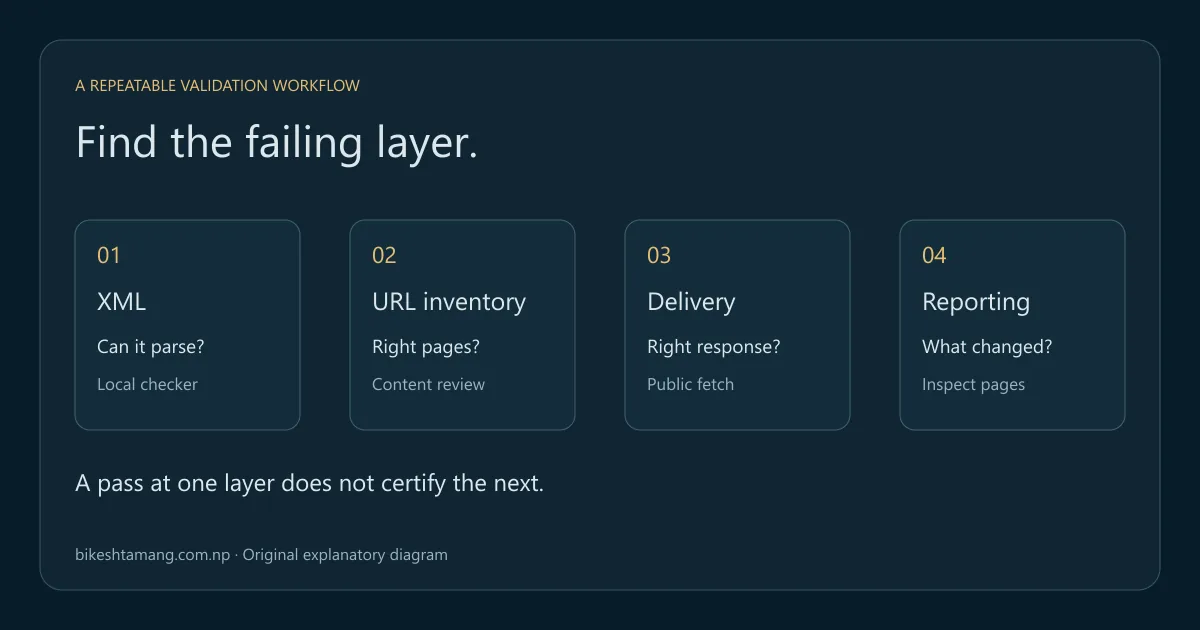
For an audit, keep three questions separate: is the URL listed, can a crawler retrieve it, and does the search engine index it? Seeing a page in an XML file answers only the first. A page can appear in the file while its server returns an error, its canonical points elsewhere or its content does not meet the search engine's indexing criteria.
An HTML sitemap is different. It is a normal navigation page for visitors, usually with links grouped by topic. An XML sitemap follows a machine-readable format. Both can be useful, but neither replaces descriptive navigation or contextual links between related pages. Use the technical SEO guide if you need the wider crawling and indexing context.
Start with a valid XML sitemap example
The following file contains two illustrative page URLs. It is intentionally small so you can see the structure without a generator or plugin. Save it as UTF-8 text with an .xml extension rather than as a document containing formatted text.
<?xml version="1.0" encoding="UTF-8"?>
<urlset xmlns="http://www.sitemaps.org/schemas/sitemap/0.9">
  <url>
    <loc>https://example.com/guides/</loc>
    <lastmod>2026-10-10</lastmod>
  </url>
  <url>
    <loc>https://example.com/guides/xml-sitemaps/</loc>
    <lastmod>2026-10-12</lastmod>
  </url>
</urlset>
The Sitemaps protocol defines the namespace, the urlset container and a loc value for each url. A sitemap can hold up to 50,000 URLs and 50 MB uncompressed. A sitemap index groups multiple sitemap files when needed.
Keep sample dates meaningful when adapting this example. Replace the host, paths and dates with information from your actual published pages. Do not upload the practice URLs to your own production sitemap. An XML file that parses successfully can still list the wrong website.
Use a sitemap index for separate files
A sitemap index points to sitemap files; a URL sitemap points to pages. Inspect the child files as well as the index. A successfully loaded index does not prove that every child file is available or that every page in those files works.
<?xml version="1.0" encoding="UTF-8"?>
<sitemapindex xmlns="http://www.sitemaps.org/schemas/sitemap/0.9">
  <sitemap>
    <loc>https://example.com/sitemaps/pages.xml</loc>
  </sitemap>
  <sitemap>
    <loc>https://example.com/sitemaps/products.xml</loc>
  </sitemap>
</sitemapindex>
Separating files by page type can make investigations easier. If a product publishing change breaks one child file, you can isolate that problem without comparing every editorial URL. Use a grouping that your publishing system can maintain reliably rather than splitting files solely for appearance.
Decide which URLs belong in the file
You can also find sitemap URLs missing from your crawl. Compare discovery sources carefully: listing a page in XML does not prove that visitors can reach it through internal links.
Build your inventory from published records and inspect the resulting URLs. For a normal page sitemap, start with preferred, public, indexable pages that return a successful response. Keep preview URLs, internal search results, retired paths and unintended duplicates out of that inventory.
Google's canonicalization documentation describes sitemap inclusion as a canonical signal. Keep the sitemap consistent with your canonical annotations. Listing a parameter version while the page declares a different preferred URL creates an avoidable mismatch; the sitemap cannot force Google to accept either choice.
| Candidate URL | Usual decision | Evidence to inspect |
|---|---|---|
| Public article at its preferred URL | Include | Successful response, correct content and intended indexability |
| Old URL redirected to a replacement | List the final preferred URL | Redirect destination and final page |
| Preview or staging page | Exclude from the public inventory | Publishing state and environment |
| Duplicate filter or tracking variation | Review before including | Intent, canonical policy and internal links |
| Permanently removed page | Remove from the current page sitemap | Intended removal status and replacement decision |
These are inventory rules for a typical public-page sitemap, not an instruction to delete URLs whenever a report labels them excluded. Investigate the page's purpose first. A specialist language or media sitemap can need additional annotations; this basic walkthrough does not validate those extensions.
Validate XML before investigating indexing
First confirm that the file is XML with the expected namespace and structure. Then inspect the URL values and compare them with your approved inventory. These checks catch different problems: malformed XML prevents parsing, while a perfectly formed file can contain duplicate or unintended URLs.
Common mistakes include a missing closing tag, a missing namespace, a relative loc value and an unescaped ampersand. For example, a literal & inside a URL value must be encoded as & in XML. An editor that shows the intended address does not prove that the saved file follows XML rules.
Download and run the practice kit
Download the XML sitemap validation practice kit. It contains a working URL sitemap, a working sitemap index, malformed and semantically invalid examples, a Python checker and a README with expected results. The checker uses Python 3's standard library and reads local files only. It does not send requests, upload URLs or submit anything to Search Console.
After extracting the archive, open a terminal in its folder and run:
python validate_sitemap.py valid-sitemap.xml --host example.com
python validate_sitemap.py valid-index.xml --host example.com
python validate_sitemap.py invalid-xml.xml --host example.com
python validate_sitemap.py invalid-urls.xml --host example.com
The first two examples should pass. The malformed XML should fail parsing. The final example should report problems including relative or mismatched URLs and duplicate entries. A nonzero exit code means the checker found a problem; it is useful when connecting this narrow check to a publishing step.
This is a teaching validator, not a complete protocol or search eligibility test. It checks the root, namespace, direct entry structure, URL format, selected date formats, duplicate URLs, expected host and basic file limits. It does not fetch pages, follow redirects, evaluate canonical tags, validate extension schemas or establish Google indexing. Use those limits when interpreting a pass.
Check the public sitemap response after publishing
Open the public sitemap address after deploying the site. Confirm the final URL, HTTP response and response body. A route named sitemap.xml can still return an HTML login screen, a security challenge or an application's fallback page. An HTTP 200 alone does not prove that the response is the intended sitemap.
Save the delivered response and run the local checker against that copy. This tests what your deployment serves rather than only what the generator created. Compare representative additions and removals with the published inventory. If the files differ, investigate the delivery path before changing otherwise correct page content.
For a command-line check, replace the demonstration URL below with your site's public sitemap. curl is an optional separate tool; it is not required by the Python validator.
curl --fail --show-error --location --dump-header sitemap-headers.txt --output public-sitemap.xml https://example.com/sitemap.xml
python validate_sitemap.py public-sitemap.xml --host example.com
Review the saved headers and final location as well as the XML. A browser session may be authenticated when a crawler is not. If delivery depends on cookies, an access challenge or a staging password, resolve that access issue. Do not disable security rules broadly just because one browser request worked differently; inspect the failing request and the relevant rule.
Select a few listed pages and check their responses too. Google's HTTP status documentation distinguishes successful responses, redirects, missing resources and server failures. Keep evidence for the sitemap fetch separate from evidence for each page fetch.
Submit the right address in Search Console
Choose the Search Console property that covers the sitemap URL. Submit the public sitemap or sitemap-index address in the Sitemaps report and record the submission date. If the report is unfamiliar, the Search Console beginner guide explains the surrounding reports.
Google's sitemap submission guidance also supports a Sitemap: reference in robots.txt. Submission is a hint, not a promise of crawling or indexing. Google ignores priority and changefreq; use accurate lastmod values for meaningful page changes rather than changing every date whenever you rebuild the file.
Sitemap: https://example.com/sitemap.xmlThis line identifies the sitemap location; it does not grant crawl access or change the site's other rules. Review the actual directives using the robots.txt SEO guide, or draft a file with the robots.txt generator. Google's robots.txt introduction also explains why crawl blocking and preventing indexing are different controls; the noindex vs nofollow guide covers the indexing side.
Keep a simple submission note: property, sitemap URL, last-read time, current status, affected child file and the action you took. Repeatedly resubmitting the same address without investigating its response produces activity without diagnosing the problem.
Interpret Search Console sitemap errors
The Sitemaps report documentation distinguishes successful processing, parsing errors and fetch failures. Its discovered-page count is not an indexed-page count. Use the detailed error and last fetch information to decide which layer to inspect next.
| Report or observation | First check | Useful evidence |
|---|---|---|
| Couldn't fetch | Exact address, public access and server response | Response headers, body and failing request details |
| Has errors | Named parsing error and affected file | Saved XML, parser output and corrected version |
| Success, but the new URL is absent | Generator inventory and delivered file | Published record, local output and public XML |
| Success, URL listed but not indexed | Individual page's indexing evidence | URL Inspection, canonical, content and access checks |
| Index loads but a child fails | Child sitemap independently | Child address, response and XML validation |
If the report says it could not fetch a file, begin with that file rather than rewriting every listed page. If the XML is valid but stale, identify which publishing or caching layer served the old list. If the current sitemap contains the URL and its page is accessible, move to page-level inspection instead of continually regenerating identical XML.
Capture the exact error and time before applying a fix. A saved response makes a retest meaningful: you can compare the previously broken file with the new response. Record what changed and whether the same failure reproduces. An old last-read date is a historical observation, not proof that today's public file is unchanged.
Follow the right CMS-specific troubleshooting path
Keep ownership of the sitemap clear. On a custom static site, the build may create the file from a content inventory. On a CMS, a built-in feature or plugin may own it. Before adding another generator, identify which public address is intended and which process updates it.
For Shopify, the official sitemap guide explains that the platform generates the sitemap automatically. Inspect that output and submit its correct address. A general XML example is not a reason to replace Shopify's generated sitemap with a manually maintained copy.
For Next.js, the sitemap metadata documentation describes file-based and generated approaches. If a published CMS record is missing from delivered XML, follow the existing Next.js sitemap cache and publishing tutorial. It covers the framework-specific reproduction and invalidation work that this CMS-neutral guide deliberately leaves to that specialist article.
When a redesign changes URL paths, connect sitemap updates to the website redesign SEO checklist. Retest old-to-new destinations, internal links and preferred URLs together. Updating a file does not repair a redirect map that sends visitors to the wrong page.
Separate sitemap success from search performance
After correcting the file, verify public delivery and keep an observation log. Inspect important URLs individually, especially new templates or recently moved content. When a page is known but not indexed, use the discovered versus crawled, currently not indexed guide to continue the diagnosis.
A useful sequence is to record the publishing event, delivered XML change, sitemap report update, page inspection result and eventual query/page performance. These events can occur at different times. Do not label the XML change a ranking success simply because the report accepts it.
Compare complete reporting periods with consistent country and device filters. A new sitemap entry may help a page become discoverable, but impressions and clicks depend on the page's relevance and search appearance as well. Keep your conclusion narrower than your evidence: a passing validator establishes a checked file, not a first-page ranking.
Frequently asked questions
Does every website need an XML sitemap?
A small, well-linked website can be discovered without one. A sitemap is still a useful publishing and audit inventory when maintained accurately. Assess the site's size, link paths and update process rather than treating the file as a mandatory ranking trick.
Should redirected URLs stay in my current sitemap?
For the current preferred-page inventory, list final preferred destinations instead of routine redirects. A migration can have a separate temporary old-URL monitoring plan. Do not mix that diagnostic inventory with the ongoing sitemap and then assume redirects are the desired permanent entries.
Why is a submitted URL still not indexed?
Submission and indexing are different steps. Inspect the page's access, response, content and canonical evidence. The sitemap's acceptance confirms processing of a file, while the page's indexing status needs its own investigation. There is no fixed indexing deadline established by this tutorial.
Can this validator prove my sitemap is ready for Google?
It can catch the specific local checks described above and in the README. It does not test all XML schema rules or fetch the listed pages. Combine its result with response checks, your approved URL inventory and Search Console evidence before signing off the publishing change.
Your next step
Download the practice kit, run the passing and failing examples, then test a saved copy of your own public sitemap. Fix the first reproducible failure and retain the before-and-after evidence. Once the file and its delivery work, investigate important pages individually instead of treating every indexing problem as a sitemap error.