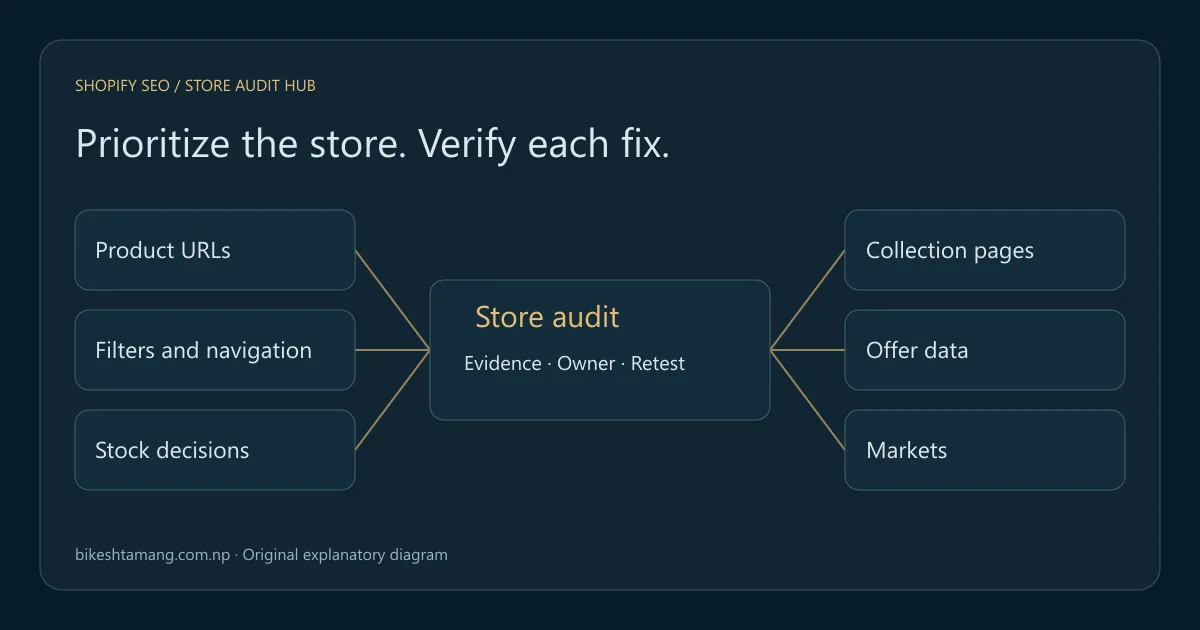
A useful Shopify SEO checklist starts with access, indexing and the shopping journey, then checks content, product data and measurement. Fix a blocked collection or the wrong product destination before spending time polishing descriptions across the catalog. Every finding should have evidence, an owner and a way to verify the repair.
This guide gives store owners and developers a shared audit order. It links to focused tutorials when a check requires deeper investigation. The downloadable worksheet includes a blank checklist and clearly illustrative examples for a fictional outdoor-products store; no client results or ranking gains are claimed.
Key takeaways
- Confirm what Shopify already provides, then inspect your actual theme output.
- Prioritize reproducible access, destination and product-data failures.
- Give collections, products and guides distinct jobs in the shopping journey.
- Retest changes and compare consistent reporting periods before judging results.
Table of contents
- Download the Shopify audit worksheet
- Choose the first fixes by evidence and impact
- 1. Establish store access and a measurement baseline
- 2. Verify public access, sitemap delivery and indexing signals
- 3. Check product URLs, canonical output and moved paths
- 4. Match collection and product pages to different search needs
- 5. Improve metadata and product content honestly
- 6. Preserve navigation, pagination and intentional filter pages
- 7. Decide how to handle unavailable products
- 8. Reconcile structured data and Merchant Center offers
- 9. Check image delivery and mobile shopping usability
- 10. Review markets, currency and language signals
- 11. Build useful supporting content and credible references
- 12. Retest releases and measure the actual outcome
- Frequently asked questions
- Turn the checklist into a reviewed action queue
Download the Shopify audit worksheet
Download the Shopify SEO audit worksheet kit. It contains twenty audit checks in editable JSON, a separate filled example and a print-friendly HTML review sheet. The README explains how to adapt the files and what each field means. No login, subscription or connection to your store is required.
For each failed check, record the affected public URL, observed behavior, source evidence, priority, owner, next action and retest method. Keep the evidence location specific: a dated response capture, a filtered report or a reviewed theme example is more useful than “SEO needs work.” Leave untested rows marked not checked.
Edit the JSON in a text editor or use the HTML sheet for a discussion and printed review. Browser edits on the print sheet are not automatically saved after closing or reloading it; keep a printed copy or transfer the agreed decisions into your project tracker. The fictional filled example demonstrates the fields rather than supplying findings you should apply to your own store.
Choose the first fixes by evidence and impact
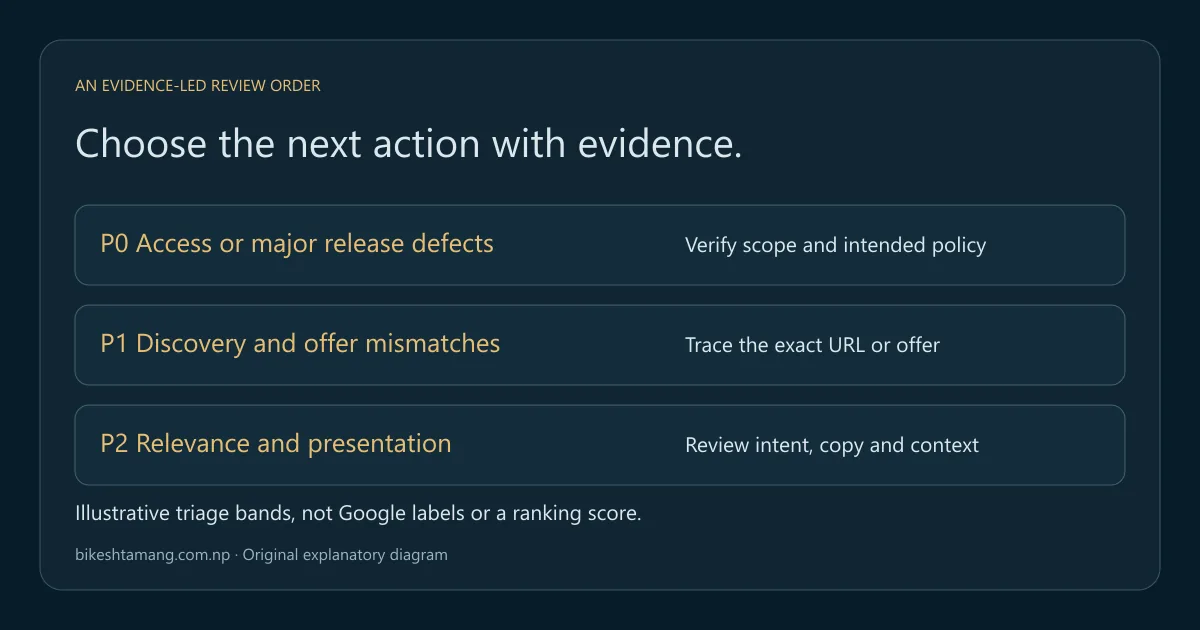
Use priorities to decide what needs attention first, not to manufacture a numerical ranking forecast. A reproducible production failure affecting important pages deserves a different response from an untested content idea. Consider affected scope, business importance, confidence in the diagnosis and the effort required to verify a repair.
| Priority | Example finding | Evidence needed before acting |
|---|---|---|
| P0: access or major release defect | Important production pages have an unintended indexing block | Response, directive, affected templates and intended policy |
| P1: discovery or offer mismatch | Products lack a usable navigation path, or offer data conflicts | Link path or specific offer comparison |
| P2: relevance and presentation | A collection answers the wrong intent or uses vague metadata | Query/page evidence and a content review |
| Backlog: unproven improvement | An app promises an uplift without identifying a current defect | A specific capability gap and a test plan |
These bands are an editorial triage method, not Shopify or Google severity labels. A legal restriction, inventory decision or deliberately private page should not be overridden simply because a tool flags an exclusion. First confirm the intended behavior with the person who owns it.
For a small review, choose representative examples: a priority collection, a product reached through it, a variant, a later collection page and a market-specific URL if applicable. Expand the sample when a shared template fails. A handful of passing examples does not certify the entire catalog.
1. Establish store access and a measurement baseline
Record the primary storefront domain, relevant markets and the Search Console property that covers them. Confirm that the responsible team can access reports after a theme, domain or staff change. Keep ownership and measurement checks separate from whether a page currently ranks.
Save a complete baseline period with its search type, country and device filters. For a US audience, review US data explicitly instead of interpreting a global total as US demand. Keep brand and non-brand query groups distinguishable. Use the Search Console query-to-page workflow to identify which collection or product appears for a query.
Check that analytics still records the intended shopping events after changes. A missing purchase event is a measurement problem even if search clicks are stable. Conversely, a correctly recorded purchase event does not prove that product pages are indexable. Your audit needs both observations without treating them as interchangeable.
Write down other changes during the test period, including promotions, stock shortages and migrations. They can change demand or conversions independently of an SEO edit. A baseline is useful only when a later comparison explains its filters and context.
2. Verify public access, sitemap delivery and indexing signals
Inspect the live storefront without relying on an administrator session. Confirm that the intended product and collection pages return the expected content and are available to the intended audience. Check for accidental password protection, unintended noindex directives and relevant crawl restrictions before changing copy.
Shopify's SEO overview describes built-in canonical, sitemap and robots features. Treat those as platform capabilities, then verify your theme and apps' delivered output. Their presence does not prove every customization still behaves correctly.
The Shopify sitemap documentation explains that the platform generates the sitemap automatically. Inspect the correct public sitemap and representative child files. Submit the appropriate address in Search Console; use the XML sitemap validation guide to distinguish a file problem from a page-level indexing decision.
Do not broadly edit robots rules to silence a report. Shopify's robots.txt.liquid guidance warns that customization can affect traffic. Document the actual rule, affected paths and intended outcome before making a targeted change. A page excluded by design is not necessarily an SEO defect.
3. Check product URLs, canonical output and moved paths
Trace a product from its collection card to its final landing page. Compare the direct product path, collection-context path and selected variant where those forms exist. Record the visible offer, canonical annotation and any redirect rather than assuming all similar addresses represent the same state.
Google's ecommerce URL guidance discusses consistent URL design and variants. Your audit should preserve useful selection behavior while checking which URL is preferred for indexing. Removing every query string can break a variant choice that matters to the shopper.
Use the Shopify duplicate product URL tutorial when a theme or app produces conflicting destinations. It provides a focused inspection process. The checklist's job is to identify that issue and assign the deeper investigation, rather than reproduce an entire Liquid debugging tutorial.
For a changed handle or platform migration, map the old address to the relevant destination and test the final content. Shopify documents redirect restrictions and management; do not assume every path is eligible. Keep unrelated homepage redirects out of the repair plan. A moved product needs a relevant outcome, not merely a successful response somewhere.
4. Match collection and product pages to different search needs
A collection should help a shopper compare a useful group of items. A product page should explain and sell a specific offer. A buying guide should answer an informational decision that is difficult to resolve from a grid alone. Those roles can support one another without all targeting the same broad phrase.
For a fictional camping store, a collection of insulated mugs could explain size choices and use cases above or around the product grid. Each mug page would cover its own capacity, materials and care instructions. A guide comparing mug materials could link to the relevant collection and products where it helps the reader choose.
Review page-specific queries and the actual catalog before assigning targets. Do not add a large generic introduction to every collection simply to reach a word count. If the page promises a product group that the store no longer stocks, resolve the mismatch rather than repeating the phrase more frequently.
Keep a compact intent map: query group, intended page, page role and supporting links. When two pages appear for similar queries, inspect their purpose before merging them. A product and its parent collection can both be useful search results even when they share descriptive words.
5. Improve metadata and product content honestly
Use a specific title, a clear main heading and a description that reflects the page's actual offer. Shopify's keyword editing guidance explains where these fields can be adjusted. Review the published result after editing; an app or theme can add text or generate a different pattern.
For product content, answer the questions needed to make a purchase: dimensions, compatibility, included items, material, care and meaningful differences from nearby offers. Use information verified by the merchant. Do not invent environmental claims, shipping promises, certifications or reviews to make an empty template look authoritative.
Keep variant details consistent with the selected offer. A US shopper arriving on a specific color or size should not have to guess whether the description and price apply to it. Add useful comparison information in plain language rather than repeating a target phrase across every heading.
For search presentation, use the meta description writing guide to review accurate examples. Google can show a different snippet, so save the changed copy and date without presenting it as the exact text every searcher will see. A copy edit needs later measurement, not an immediate claim of improved CTR.
6. Preserve navigation, pagination and intentional filter pages
Follow the store's navigation as a visitor. A relevant collection should lead to products through usable links, including items beyond its first visible screen. Google explains the role of linked category and product paths in its ecommerce site-structure guidance.
Test later collection pages and any load-more behavior. Google's pagination guidance recommends distinct URLs and crawlable links for paginated sequences. Do not automatically canonicalize every later page to page one. Use the ecommerce pagination tutorial for the detailed checks and edge cases.
Filters need a deliberate policy. Some filtered selections can serve a useful landing-page intent; others create repetitive combinations without distinct value. Decide the content and discovery role before choosing a technical control. The faceted navigation guide works through those decisions instead of assuming every filter should be indexed or blocked.
If an important published product is missing from the reachable crawl, compare it with known URL inventories before adding arbitrary links. Check source and rendering settings first. A product visible only through an internal search interaction may require a clearer browsing path.
7. Decide how to handle unavailable products
Separate a temporary stock shortage from a permanently discontinued offer. A temporarily unavailable product can still have useful specifications, support information and a genuine expectation of return. Removing its page immediately can create unnecessary broken references and a worse experience for returning shoppers.
When a product is permanently retired, review whether a relevant replacement exists and whether the original page still serves a useful support or comparison purpose. Avoid redirecting every unavailable item to a broad collection regardless of relevance. Document the merchant's inventory decision before changing URLs or indexing signals.
Keep visible availability, selected variants and offer data aligned with the actual situation. The out-of-stock product SEO guide provides the keep, redirect or remove workflow. Assign that decision to the right catalog owner rather than letting an automated cleanup silently retire valuable pages.
8. Reconcile structured data and Merchant Center offers
Inspect a real product URL's structured data and compare it with the visible selected offer. Check price, currency, availability and product identity. Google's product structured-data overview explains the available search features; valid markup does not guarantee a particular appearance or ranking.
Use the merchant-listing requirements for the applicable fields and eligibility rules. Trace conflicting markup to its source before adding another generator. A theme, product app and custom snippet can output overlapping descriptions of the same offer.
For Merchant Center, follow the submitted landing URL through the market and variant selection. Compare the feed, landing page and checkout behavior that applies to that offer. Use the Shopify price-mismatch investigation when those values disagree. A successful catalog sync alone does not verify the public representation.
Keep feed or merchant eligibility issues distinguishable from ordinary web-search performance. A product approval and a collection's query ranking are different outcomes. Record the specific system and offer affected so a repair is tested against the right evidence.
9. Check image delivery and mobile shopping usability
Open representative collections and product pages at a narrow screen width. Check that navigation, selection controls, price and important descriptions remain usable. Test the actual shopping task rather than reducing the review to a single performance score.
Use appropriate image dimensions and responsive delivery. Compress new raster assets, provide width and height, and describe meaningful product information in alt text. Treat this site's under-150-KB image target as a practical publishing budget, not a universal Google ranking threshold. A large zoom image and a small collection thumbnail can need different resources.
Avoid delaying an important initial product image unnecessarily, and lazy-load suitable below-the-fold media. Review performance before and after app or theme changes. Shopify's web performance resources provide a starting point for platform-specific investigation.
If several apps inject overlapping scripts, document which feature each supplies and whether the cost is justified by the shopping experience. Disable or remove a production integration only through the merchant's change process. The audit should identify the evidence and owner, not assume every script is disposable.
10. Review markets, currency and language signals
Use the actual market URLs configured for the store. Verify that a shopper can access the intended product, language, currency and delivery information from that market's entry point. Do not manufacture regional pages for places the merchant cannot serve.
Shopify's international-domain documentation describes market URLs and automatic international SEO handling. Check the delivered canonical and language annotations rather than assuming another app must add them. Overlapping implementations can create inconsistent signals.
Use the Shopify Markets hreflang audit to investigate return links, market-specific product URLs and conflicts. A US/Canada example is useful only when those markets actually exist in the store. The worksheet's example market is illustrative and does not establish that any particular client sells there.
11. Build useful supporting content and credible references
Write supporting guides when they answer a genuine pre-purchase or post-purchase question. Link from the guide to the collection or product where it helps complete that task, and link back where the product page needs a deeper explanation. Avoid filling the blog with loosely related subjects merely to publish more often.
Use original product knowledge, transparent testing and accurate policies as the foundation for references and coverage. When contacting a publication or partner, offer useful information relevant to its audience. Do not treat purchased ranking links, invented testimonials or undisclosed claims as checklist shortcuts.
Keep a record of important external destinations and legacy URLs during migrations. The WooCommerce-to-Shopify migration guide covers the mapping and verification needed when old references still matter. A clean new navigation does not repair an older external address by itself.
12. Retest releases and measure the actual outcome
After a change is public, repeat the acceptance check recorded in the worksheet. Verify the affected source link, destination, canonical, selected offer or report—not simply whether the team closed a ticket. For shared templates, inspect several representative products and collections after deployment.
Maintain a small release log with the date, changed component, evidence and responsible owner. Review significant catalog imports, theme updates, app changes and market launches. If a defect affects critical pages, resolve it through the release process before starting unrelated copy experiments.
Allow time for search systems to observe changes. Google's recrawl guidance says requests do not guarantee inclusion in search results. Do not promise automatic indexing within a fixed number of hours because a publishing event or sitemap submission succeeded.
When enough complete data exists, compare equivalent periods with consistent country, device, query and page filters. Separate impressions, CTR, average position and conversions. A change in query mix can move aggregate CTR without showing that a description helped or hurt. Keep the conclusion as specific as the evidence supports.
Frequently asked questions
Do I need a paid Shopify SEO app?
Only when a specific capability gap justifies it. First inspect the platform's built-in features and the actual theme output. Document what the app would change, how it interacts with existing tools and how you will verify its result. An installation alone is not a completed optimization.
Which pages should I audit first?
Start with commercially important collections and products, recently changed templates and known failures. Include a variant and later collection page where relevant. Use the sample to identify shared defects, then expand coverage rather than claiming that a few passing pages certify the entire store.
Can the worksheet guarantee better rankings?
No. It organizes checks, evidence and responsibility. A passing row establishes a verified behavior or a reviewed content decision. Search visibility depends on relevance, competition, authority and other conditions that the worksheet does not control or forecast.
How often should I repeat the checklist?
Repeat affected checks after meaningful changes and investigate actual errors promptly. Choose a broader review cadence that suits the catalog and traffic. Keep the scope and dates explicit; a frequent unreviewed export is less useful than a smaller queue with clear repairs and retests.
Turn the checklist into a reviewed action queue
Choose one important collection and product path, run the relevant checks and complete the evidence fields. Assign the highest-confidence repair, publish it through the normal release process and retest. Expand the queue once the team agrees on what passing behavior looks like. If you need help interpreting the findings, an SEO audit can connect the store's evidence to a prioritized plan.